How to properly mount, position, adjust and operate a laser display projector.
What you need:
- A Magnum Lighting home laser system
- USB Micro cable
- An approved US FDA variance prior to use of the laser.
- Authorized persons should only be employees of an FDA variance holder.
- Mac OS X 10.6, Windows PC or Android device and the app.
Download link:


Installation and Operation:
- Your Magnum Lighting laser projector must be securely mounted or immobilized to prevent unintended movement or misalignment. This is to prevent laser emissions from being redirected towards people outside the predetermined safety areas in case of any accident such as tripping on the USB or power cable.
- Adjust the beam block with the unit powered off, make sure the key is not connected, secure projector aiming, then make adjustments to the beam block. The beam block must be in place and properly adjusted to prevent laser light from entering accessible areas. To prevent scanners from directing laser light beyond the defined scan angle in case of software or mobile device malfunction, always mount the laser projector with the base down, and adjust the front mounted beam block to prevent misdirected or ‘over-scanned’ laser beams from entering the audience accessible areas below 3 meters, or any other location which is accessible. Prior to show playback, carefully adjust this cover with the laser at very low power (1mW or below) by standing behind the projector. Do not face the front of the projector.

Note: You may need to repeatedly power the laser back on to check for the proper beam block setting until it prevents any scanning into audience areas. All beams must be maintained at least 3 Meters (10 feet) above the floor level and 2.5 meters horizontally (about 8 feet) between high powered laser effects and any area where the audience is permitted to sit or stand. Eye exposure to laser light can cause instant injury and permanent blindness.
-
Place appropriate compliant ANSI area warning sign(s) in and around the laser show venue especially areas accessible to the audience.

-
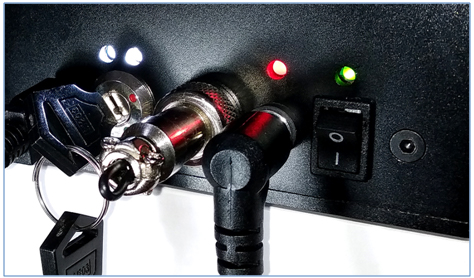
Connect the USB cable, power cable (optional if LC-1000 is fully charged), interlock, key. Use the on/off switch to power the LC-1000 laser projector. Turn the Key Control to the run position to enable laser operations.
-
Connect the LC-1000 to your Mac, PC or Android device via USB cable.

-
Download and install the app from “www.magnumlighting.com/download”. The app is available for Windows, MAC or Android. After the installation is complete, look for the app icon and launch the program.
-
The app will detect if the LC-1000 is connected. It can then be turned on or off from the power menu in the top left corner of the app. Pressing the ESC key will also turn off the laser.

Important Notes:
- The laser system can be turned off at any time using the LASER OFF button on the upper left side of the app.
- While securing projector aiming, turn off the unit and remove the key. Check for the proper beam block setting. Repeat until beam block prevents any scanning into audience areas.
-
From the main menu, you can easily select from the different apps, modes and laser show effects available. Audio, power level, color/hue and other settings can also be adjusted from here.

Watch the video below for safe and secure mounting methods and additional setup information.